14 days free

Auto repair shop softwareYou run the workshop.
We'll keep the paperwork.

Booking, vehicle check-in, work orders, customer approval, parts, cash and your shop page on Google — all on your phone, in one app. Your customer doesn't call to ask “is my car ready?”; they follow it on screen.

Card
Not required
Users
Unlimited
Plan
One, all included
Devices
iPhone · web
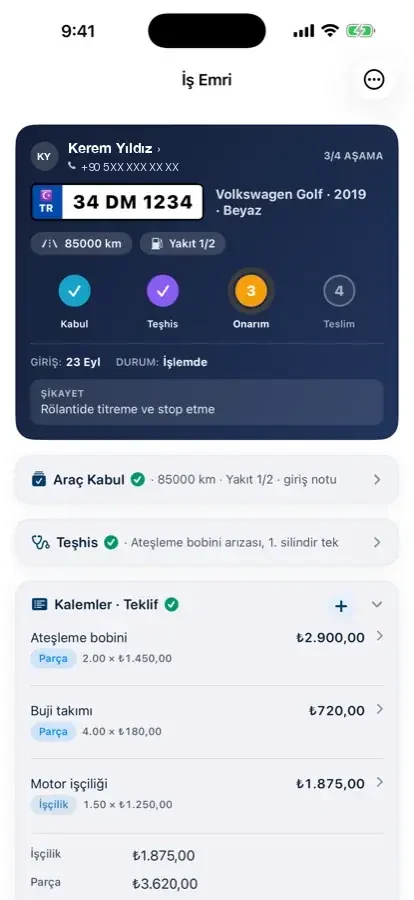
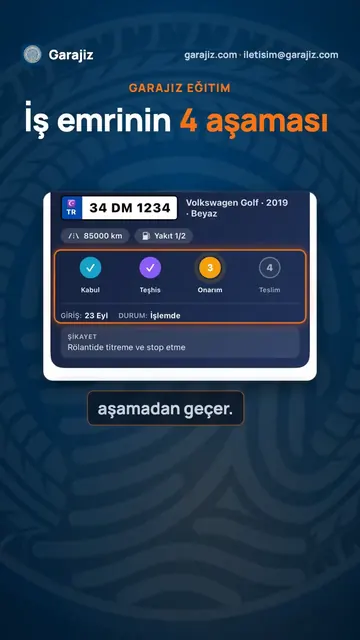
Garajiz work order screen: Volkswagen Golf, plate 34 DM 1234, with check-in, diagnosis, repair and delivery stages
Customer approved
Brake kit · ₺5,723
34 DM 1234 in repair
Customer watching live
Real data from the field · Yascar Servis
4,7 rating (7 reviews) 110+ jobs completed 17 years in the trade
See the storefront → Source: Garajiz storefront page, October 2026

01 What you can stop doing

Half the day goes on the phone, not on repairs.

Notebooks, Excel, WhatsApp groups and memory. Garajiz replaces them — not a new habit, just your current workflow, organised.

Phone“How's my car doing?” calls

The customer sees the status from the link or QR sent to them.

Approval“That's not what I agreed to” arguments

The price goes out in writing and the customer approves with one tap. The record stays.

PartsCalling 5 suppliers one by one

The list goes out on WhatsApp and prices come back side by side.

MoneyUnpaid bills left in a notebook

Payments, instalments, promissory notes and cash in one place; whatever is due shows up in front of you.

02 A vehicle's day at the shop

From the door to the payment,
on one screen.

A vehicle comes in through the door in the morning and is handed back in the evening. Every step below is a real screen from the app.

  1. 08:30 · Booking1 / 6

    The customer books by themselves.

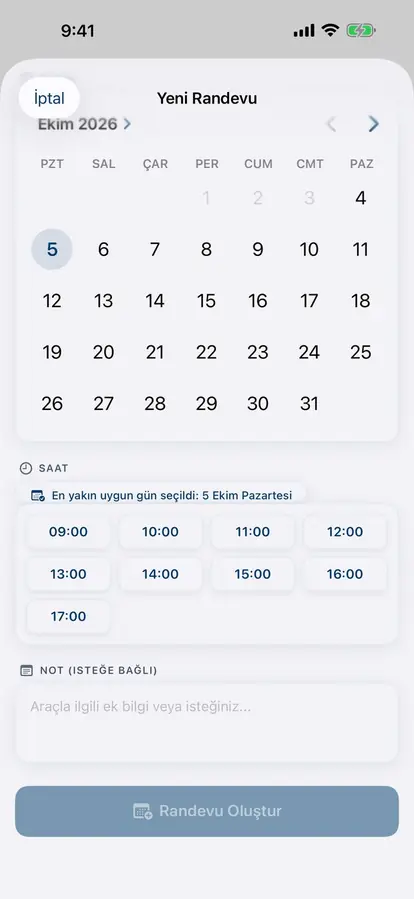
    From your shop page on Google or from the app, they see only the free slots and pick one. You decide how many vehicles you take at once, based on your lifts; approval is one tap. How it works ↓

    • Online booking
    • Free slots by lift capacity
    • One-tap approval
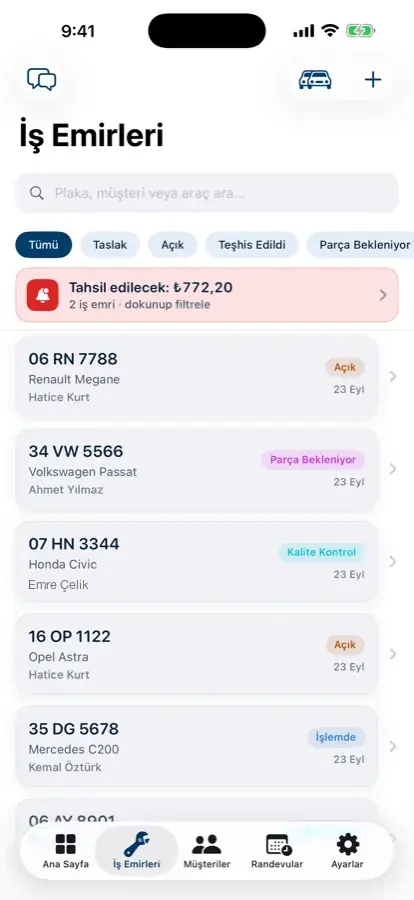
    Booking screen
    In a new booking you pick the day; available times are listed below.
  2. 09:10 · Check-in2 / 6

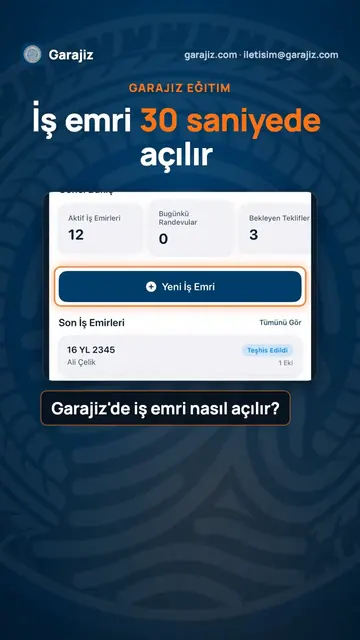
    Vehicle check-in in 1 minute.

    Mileage, fuel level, photos of existing damage and items received (keys, registration, spare wheel…) are saved to the work order. The condition the vehicle arrived in stays on record with date and time. Check-in record ↓

    • Photo damage record
    • Mileage & fuel
    • Items received
    • Make and year from the VIN
  3. 10:05 · Diagnosis & quote3 / 6

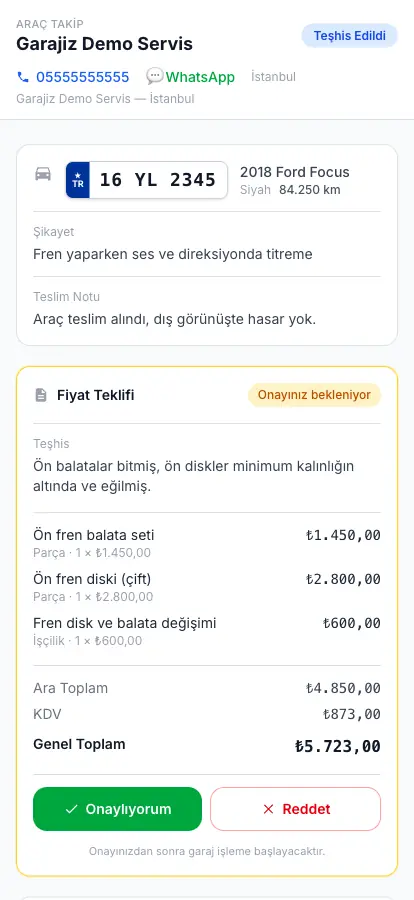
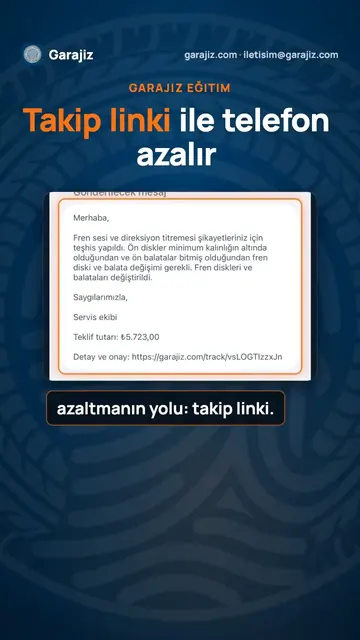
    The quote goes out on WhatsApp; the customer approves.

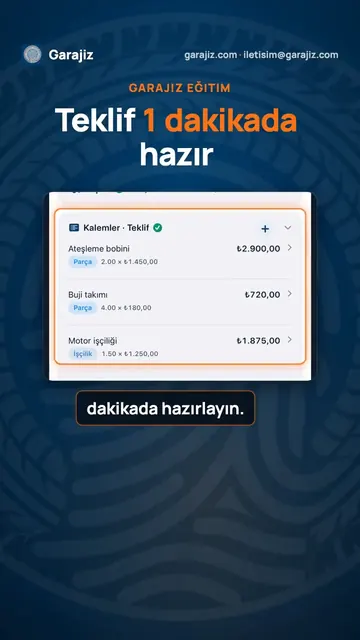
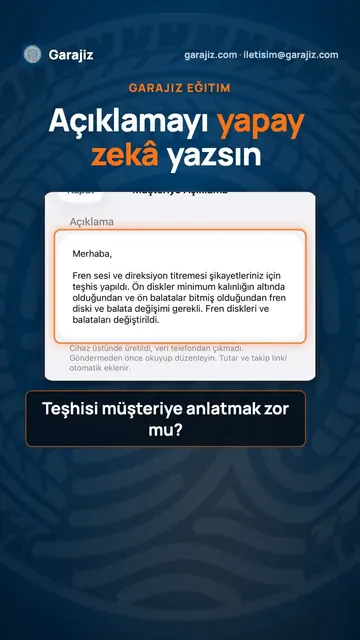
    Parts and labour items, total including VAT. The customer taps the link and says “I approve”. Approval or rejection is saved to the work order with date, time and the approved amount. Sample work order / quote PDF (Turkish) ↗

    • Itemised quote
    • Digital approval
    • PDF quote
    Customer's quote approval screen
    Items and the grand total sit right above the customer's Approve button.
  4. 10:20 · Parts4 / 6

    Buy parts at the best price.

    Send the parts list to several suppliers at once; each enters prices from their own link. Compare, choose, and your margin is added automatically. Stock is updated. The full flow ↓

    • Supplier quote comparison
    • Stock & warehouse
    • Purchase orders
    Work order detail and items
    Parts and labour items sit on the work order with quantity and unit price.
  5. 13:40 · Repair5 / 6

    The customer follows the car from a link.

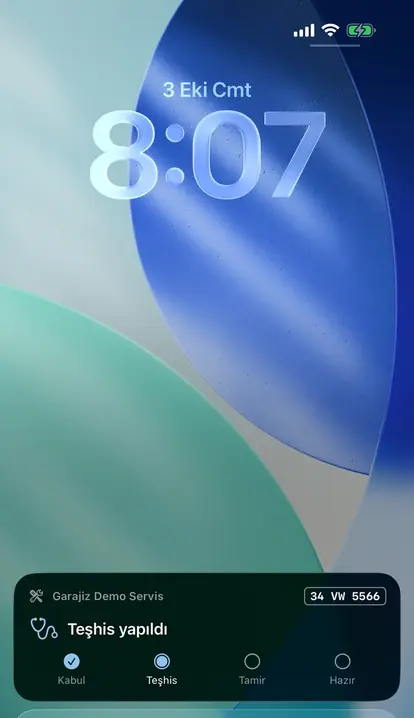
    Received → Diagnosis → Waiting for parts → In repair → Quality check → Ready → Delivered. When the stage changes, the tracking page updates instantly; customers with the app get a notification and can follow it on their lock screen. When the car is ready, they're told by email. The phone stays quiet and the technician gets on with the job.

    • Live status tracking
    • Tracking by link and QR
    • In-app notifications
    Live repair tracking on the lock screen of a customer with the app
    The diagnosis stage shows on the lock screen of a customer with the app.
  6. 16:58 · Delivery & payment6 / 6

    Delivery, then payment.

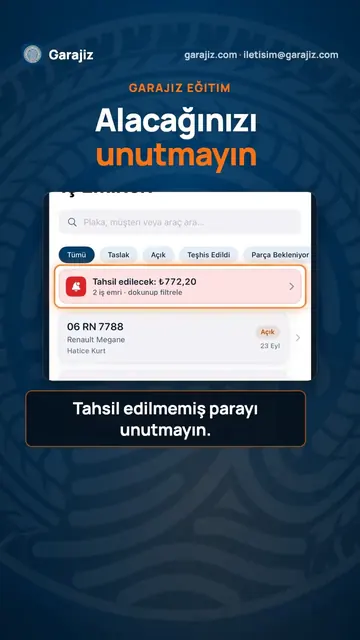
    Mileage is recorded at delivery. Then the proforma invoice and payment: cash, card, bank transfer, instalments or promissory note. The amount to collect sits at the top of the work order list. The job is added to the vehicle passport.

    Coming in the next versionA repeat photo record at delivery, the customer's “I've received it” confirmation and a check-in ↔ delivery comparison. What it will look like ↓

    • Delivery mileage
    • Proforma invoice & cash
    • Instalments & promissory notes
    Work order list: the total to collect at the top
    The amount to collect and the related work orders sit at the top of the list.

● Booking by capacity

Online booking: as many cars as you have lifts. No more, no less.

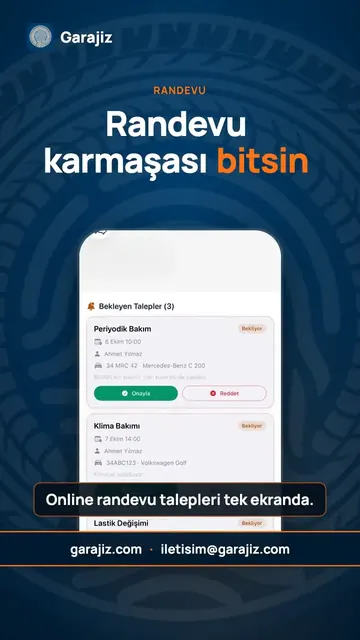
For each day you set how many vehicles you can take at once. Your customer sees only the slots that are really free; full slots can't be booked, and the “do you have room?” calls stop. The request lands with you and you approve it with one tap.

Shop · settings You set the capacity
9:40●●
‹ SettingsBooking Hours.
Thursday08:30 – 18:30
Slot length60 min
Concurrent vehicles
Your lifts: 3
3
Blocked time12:00 – 13:00
Today's occupancy
Vehicle owner · app or shop page Only free slots
9:41●●
‹ BackBook.
Garajiz Demo Servis
Scheduled service · Ford Focus
İstanbul
EmptyFullClosed
Pick a time
  • Set day by dayFewer technicians on Saturday? Lower the capacity for that day.
  • Time off and holidaysHours you close (time off, holidays, custom blocks) are not shown to customers.
  • No double bookingsIf two people want the last slot, the system accepts only one.
  • The same calendar everywhereThe app and your shop page on Google show the same free slots.

Screens are drawn from the real flow in the app; times and occupancy are examples.

● Check-in & delivery record

Hand it back as you got it. On record.

Today: at check-in, mileage, fuel, damage photos and items received are saved to the work order; at delivery, mileage is recorded.

Coming in the next versionAt delivery: photos from the same angles, a repeat of the fuel and items record, the customer's on-screen “I've received it” confirmation and a side-by-side comparison of both records. The example below shows that version.

  • Same angles, twiceEvery photo taken at check-in gets a matching photo at delivery. Front, back, sides, dashboard.
  • Mileage and fuel difference at a glanceTest-drive mileage is visible; fuel at check-in and delivery sit side by side.
  • What came in went back outKeys, registration, spare wheel… ticked off one by one at delivery.
  • Customer confirmation, time-stampedThe customer says “I've received my car in this condition”; the confirmation is recorded.
16 YL 2345 · Check-in ↔ Delivery Coming in the next version✓ Customer confirmed · 16:58
Check-in 15 Oct · 09:12
084250 km EF ⛽ ½ Check-in · 15.10.2026 09:12
Delivery 15 Oct · 16:58
084262 km EF ⛽ ½ Delivery · 15.10.2026 16:58
Check-in · 09:12Delivery · 16:58
Mileage84.25084.262 +12 km test drive
Fuel½½ · same
DamageRear-right scratch, front-left rim scuffNo change
Photos5 angles5 angles · matched
ItemsKey · Registration · Spare wheelAll returned
ApprovalShown to customer“Received” · 16:58
2 days after delivery“You gave the car back scratched, and the tank is empty.”
Both records are openedThe scratch is already in the 09:12 check-in photo. Fuel was ½ at check-in and ½ at delivery.
OutcomeThe customer's delivery confirmation is on record too. The records open side by side and the dispute is settled quickly.

03 Getting prices from suppliers

Don't call five suppliers.
Let the prices come to you.

The parts list goes out on WhatsApp with one tap. Suppliers don't download an app or create an account; they tap the link and type their price. You compare side by side, add your margin and place the order.

Suppliers asked
3
Cheapest full basket
₺4.480
Cheapest mix
₺4.320
1 From the work order Shop · iPhone

Choose the parts and the suppliers.

The part lines from the work order come pre-filled. Labour and your own price are not sent.

2 Supplier's phone Supplier · WhatsApp

The supplier gets a clean request.

Vehicle, VIN and parts list in one message. Each supplier gets their own link.

3 Taps the link Supplier · browser

Types the price, marks “Out of stock”, sends.

No sign-up, no password, no app. They can add a delivery time too.

4 Quotes arrive Shop · iPhone

Compare side by side.

The cheapest price for each part is green. Buy everything from one supplier, or each part from whoever is cheapest.

5 One tap Shop · iPhone

Add your margin, place the order.

The sale price goes on the work order and the cost is kept. The supplier gets an order confirmation at cost price, and what you owe them is recorded in Finance automatically. You choose the payment terms in the web panel; it's coming to the iPhone app in the next version.

The supplier's number stays with you.

Each supplier gets a separate link; they can't see each other's prices.

Your price for the customer, your cost for you.

The margin is added per part or on the total; the cost is kept on record and goes into the profit report.

Your supplier directory grows.

Search suppliers by brand tags: type “Ford brake” and pick the relevant ones.

Screens are illustrations drawn from the real flow in the app; supplier names and prices are examples.

04 What your customer sees

Trust for your customer,
repeat business for you.

Your customer doesn't have to download an app. A link is enough. A transparent shop is one they come back to.

Live tracking · link or QR

They tap the link and see the status.
You don't pick up the phone.

The customer sees the status from the link or QR sent to them. No app, no password. The moment your technician changes the stage on the work order, the customer's screen changes too.

Try it as the shop: change the stage →

  • Estimated delivery, at the topThe customer's first question. If it slips, it turns red, so they see it before you have to say it.
  • One tap to reach youA customer with a question calls or messages your location from the page.
  • Quote approval on the same pageWhen a price comes up, “Approve / Decline” appears here.
  • Pay by QR when readyThe amount is fixed to the work order total; the customer pays by FAST (Turkish instant bank transfer).

Illustration of the real tracking page · sample data

Vehicle passport · QR

What was done, when, and at what mileage?

Every delivered job is added to the vehicle's passport automatically. The customer sees the full history with one QR. It's a tidy service record they can show a buyer when selling the car, and your shop's name is on every line. The passport only includes work done at shops that use Garajiz.

16 YL 2345 2018 Ford Focus1.5 TDCi · Diesel · Black
Service records
6
Last mileage
84.250
First record
Aug 2024
Mileage across records
  • The customer remembers you at every service; the history builds up with you.
  • One QR for a used-car buyer: “serviced regularly.”
  • On the next visit, the technician sees the history on one screen.
  1. 84,250 km
    Brake system renewedGarajiz Demo Servis · IstanbulDelivered

    Work Done

    • Front brake disc and pad replacement
    • Brake fluid replacement

    Parts Used

    • Front brake pad set
    • Front brake discs (pair)
    • Brake fluid DOT4
  2. 76,900 km
    Scheduled serviceGarajiz Demo Servis · IstanbulDelivered

    Work Done

    • Engine oil and filter change
    • Air and pollen filter change
    • General check (18 points)

    Parts Used

    • Engine oil 5W-30 ×5
    • Oil filter
    • Air filter
    • Pollen filter
  3. 68,400 km
    Winter preparationGarajiz Demo Servis · IstanbulDelivered

    Work Done

    • Winter tyre fitting, balancing
    • Battery test
    • Antifreeze check and top-up

    Parts Used

    • Antifreeze ×2
    • Balance weights
  4. 61,200 km
    Air-con serviceGarajiz Demo Servis · IstanbulDelivered

    Work Done

    • Air-con gas recovery and recharge
    • Leak test

    Parts Used

    • Air-con gas R134a
    • Cabin filter
  5. 55,800 km
    Timing belt kit replacementGarajiz Demo Servis · IstanbulDelivered

    Work Done

    • Timing belt and tensioner replacement
    • Water pump replacement

    Parts Used

    • Timing belt kit
    • Water pump
    • Antifreeze ×3
  6. 47,300 km
    Front suspension repairGarajiz Demo Servis · IstanbulDelivered

    Work Done

    • Front shock absorber replacement
    • Wheel alignment

    Parts Used

    • Front shock absorber ×2
    • Shock absorber mount ×2

Drawn with the structure of the real passport page; the vehicle and records are examples. Prices are not shown in the passport.

Vehicle File · owner app Coming in the next version

Inspection, insurance, vehicle tax. All on one screen, with reminders on time.

Inspection, insurance and driving licence dates are reminded today; the one-screen Vehicle File with comprehensive insurance (kasko), emissions test and vehicle tax (MTV) comes in the next version. Your customer sees whichever date is closest at the top, in colour; service history, warranties and documents sit in the same file.

InspectionEmissions testThird-party insuranceComprehensive insuranceVehicle tax (MTV) · Jan & JulDriving licenceRegistration
Your customer opens the app every monthRepairs happen once a year; dates are always coming up. Your shop stays on the customer's phone.
They come to you before the inspectionA “21 days until your inspection” notification is the most natural invitation for a pre-check.
The service history fills up from youEvery job you deliver is added to the file's history and the passport automatically.
No dates to enter for vehicle tax Coming in the next versionThe instalment deadlines (31 January, 31 July) will be built into the app, with a reminder 15 days before.
GZ21 days until your inspection16 YL 2345 · deadline 5 November · now

Illustration of the app screen in the next version · sample data

WhatsApp link

They see the price and approve with one tap.

Itemised prices, VAT, total. Approval or rejection is saved to the work order with date, time and the approved amount.

Customer account · optional

A customer whose history isn't lost is a customer who comes back.

No app is needed for tracking or the passport. Customers who want one open a free account and keep all their vehicles, bookings and service history in one place.

05 All features — in one plan

Everything you look for in shop software.
No add-on modules to buy.

No per-user or per-module fees. In Garajiz every feature is on from day one.

Workshop

  • Inspection & checklist templates
  • Scheduled service plansBy mileage and months; overdue ones flagged
  • Make and model year from the VINFilled automatically in the web panel

Customers

  • Vehicle File Coming in the next versionToday: inspection, insurance and licence reminders. Next version: comprehensive insurance, emissions, vehicle tax and a one-screen file

Parts & stock

  • Stock & multiple warehouses
  • Suppliers & purchase orders
  • Collect supplier prices over WhatsAppCompare, add margin, place the order
  • Card payment (POS) recordsTerminal, fee and net amount to the bank
  • Barcode part searchScan with the camera
  • Low-stock alertParts below the minimum quantity are flagged

Money

  • Cash & bank accounts
  • Supplier payables and due datesPayment terms on orders, a per-supplier summary and a “due within 7 days” indicator (web panel; in the iPhone app with the next version)
  • Expenses
  • Profit, revenue and finance reports

Team

  • Unlimited users
  • Roles and permissionsTechnician, service advisor, accounting, owner
  • Staff, shifts and payroll
  • Multi-location management
  • Activity log (who did what, when)

Growth & platform

  • A separate page per service
  • CSV export (opens in Excel)Customer and vehicle list
  • Automatic backup (Google Drive)
  • Support in Turkish

06 Google storefront

Software isn't a cost,
it's a channel that brings customers.

Every Garajiz shop gets its own page with its services and photos that can be found on Google. A page where a driver searching for “gearbox repair in Kadıköy” can find you and book; rankings are not guaranteed.

  • A page per service — each one a separate search result
  • Photo gallery, opening hours, map, reviews
  • One-tap booking, calling and messaging
  • No need to build a website or pay an agency
garajiz.com › servis › ornek-servis Sample Auto Service — Gearbox Repair, Kadıköy Auto repair · Kadıköy, Istanbul Gearbox overhaul, scheduled service and diagnostics. Book online and follow your car's status live.
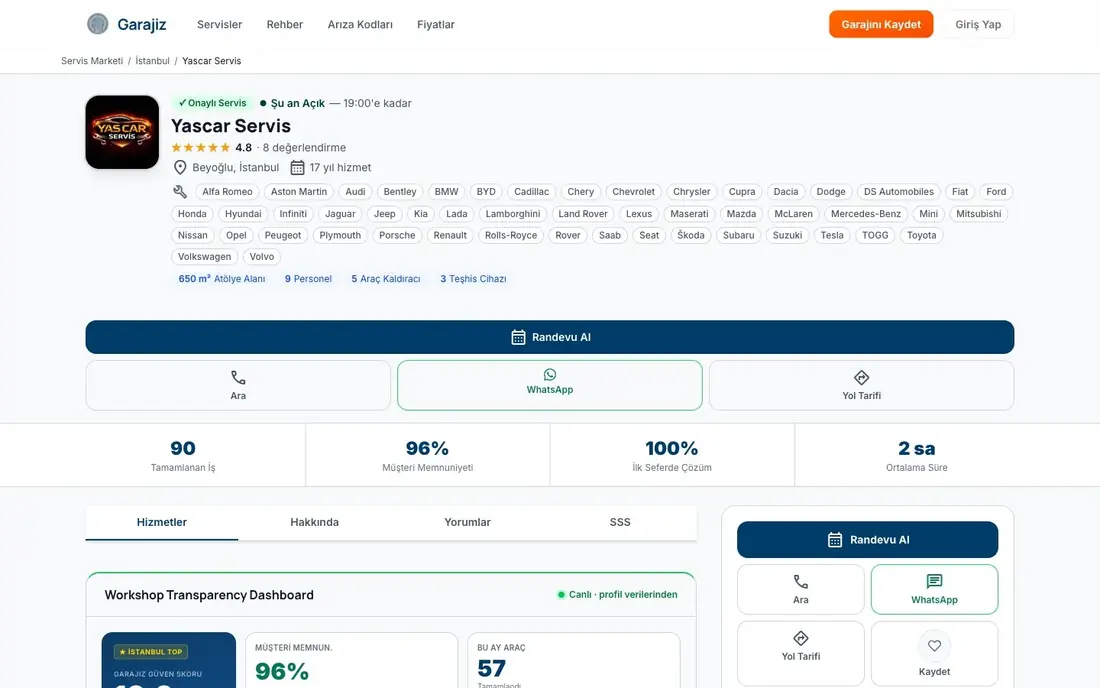
garajiz.com/servis/yascarservis
A real shop's Garajiz storefront page (desktop)
Yascar Servis's storefront with its rating, the brands it works on, and Book, WhatsApp and Directions buttons.

The search result above is an example. The page below belongs to a live Garajiz shop.

07 With your own numbers

“Is my car ready?”
How many hours a month does it cost you?

Set the sliders for your own shop. We don't make up estimates; the maths is yours.

120
2
4 min

Time spent on status calls

16hours / month

≈ 2 full working days. Live tracking makes most of these calls unnecessary.

08 Today vs. Garajiz

How it differs from notebooks
and desktop software.

Not a new way of working, and not a complicated ERP. Just the scattered pieces of today, gathered in one place.

TopicTodayWith Garajiz
Job trackingNotebook, whiteboard, memoryStaged work orders; everyone sees the same screen
Customer approvalVerbal, on the phoneWritten quote + digital approval record
Status updatesPhone calls all dayThe customer follows it on their own phone
Parts pricesCalling suppliers one by oneOne send, prices side by side
ReceivablesA notebook of unpaid billsInstalments, promissory notes, due-date alerts
New customersWord of mouth and luckA shop page people find on Google
Data safetyA lost notebook, a broken PCIn the cloud + automatic backup
SetupSoftware installed on a PC, licencesNothing to install; from your phone or browser
AccessOnly from the computer in the shopFrom anywhere; technicians and advisors on their own screens
UpdatesExtra fees for new versionsAutomatic and free

09 Price

One price.
Everything included.

No per-user fees, no add-on modules. It scales only with your number of locations. Cancel any time.

garajiz Pro · first location

$99 / mo
  • Every feature, from day one
  • Unlimited users and technicians
  • Google storefront page included
  • iPhone app and web
  • 14 days free — no card required
Start free trial

How many locations do you have?

Locations
1
First location$99
Total
$99 / mo

Additional location: $59/mo or $590/yr. For 5+ locations, contact us.

● Guides

What is auto repair shop software, and who uses it?

Auto repair shop software (also called garage management or workshop software) records a shop's daily work, from vehicle check-in and work orders to parts, stock and payments. Shops used to rely on desktop programs installed on the computer in the shop. Today's shop software runs in the cloud: you open work orders from your phone, the customer approves the quote from a link and follows the car's status themselves.

Mechanical repair and scheduled service

Work orders, service plans, oil and filter stock, and a list of customers due for service.

Body and paint

Photo damage records, check-in records, itemised quote approval.

Auto electrical and electronics

Fault code (OBD) guide, diagnosis notes, supplier quotes for parts.

Tyres and wheel alignment

Stock, card payment records, seasonal tyre bookings and slots by capacity.

Independent and multi-location shops

Per-location reports, roles and permissions, unlimited users.

Fleets and dealerships

Vehicle history and passport; inspection and insurance reminders (vehicle tax and comprehensive insurance in the next version).

What to look for when choosing shop software

  1. Does it need installing? Garajiz runs in the cloud; no installation, no server.
  2. Can it be used from a phone? There's an iPhone app; on computers and tablets it runs in the browser.
  3. Does it talk to the customer? Quote approval and live tracking reach the customer by link.
  4. Is there a per-user fee? No; users are unlimited.
  5. Is the price public? One plan with every feature; it scales with your number of locations.
  6. Do you keep your data? You can export it and back it up to your own Google Drive.

10 Your questions

Straight answers.

Is the software free?

You can try Garajiz free for 14 days with every feature and no card. After that there is one price: $99/month for the first location, with 2 months free on yearly billing. Users are unlimited.

Can I use it from my phone?

Yes. In the iPhone app you open work orders, take photos and send quotes (the app is in beta: install it with TestFlight). On Android phones, tablets and computers it works in the browser with the same account.

Do I need to install anything?

No. Garajiz runs in the cloud: create an account and start right away. Updates are automatic and free, and there is nothing to install on your computer.

Can I issue Turkish e-invoices (e-Fatura)?

Garajiz creates a proforma invoice from the work order and records the payment. There is no e-Fatura / e-Arşiv integration yet, so you keep issuing official invoices with your current e-invoice provider.

Does it suit body & paint, tyre or auto electrical shops?

Yes. Work orders, photo damage records, inspection templates, stock and booking work the same way for every type of shop.

I'm not good with computers. Can I still use it?

The app is designed for phones: if you can use WhatsApp, you can use Garajiz. Big buttons and few screens. We do the first setup with you over the phone (in Turkish).

What about my old records?

Bulk import of old records isn't available yet. A customer and vehicle record is created in a minute with the work order when the vehicle first comes in; in the web panel the make and model year are filled from the VIN. You don't have to stop work: open new vehicles in Garajiz from day one. You can export your customer and vehicle list as CSV at any time (opens in Excel).

Will my technicians use it too? Is there an extra fee?

Users are unlimited and free. Each user gets a role. On the technician screen, a technician sees the jobs in the workshop and adds items; prices, cash and finance stay hidden.

Who owns my data? What if I leave?

Your data is yours. It can be backed up automatically to your own Google Drive, and you export it when you leave. No contract, no commitment.

Does my customer have to download an app?

No. Quote approval and live tracking open from a link or QR sent to the customer. Customers with the app also get notifications, and any customer can open a free account to see their vehicles' history.

Will I be charged automatically when the trial ends?

No. We don't ask for a card for the trial. If you want to continue, you choose.

● Start today

Check in tomorrow's first car with Garajiz.

14 days free. No card. Every feature on.

📱 The iPhone app is in beta: try it with TestFlight · on a computer, start on the web.

Questions? destek@garajiz.com — write to us or use the contact page .

Featured on Product-Tower
Features Start 14 days free